Still looking for a Mint replacement?
Mint shut down in March 2024, and a lot of people never really landed anywhere after it. If you are one of them, here is an honest look at whether Atom Budget is the thing you have been trying to find, including the parts of Mint we make no attempt to replace.
How much of your paycheck is actually yours?
What actually happened to Mint
Intuit bought Mint back in 2009, let it coast for about a decade, and then closed it and pointed everyone at Credit Karma. The budgets did not survive the move. Credit Karma will show you your accounts and your credit score, but the thing Mint people actually used, the budget, was simply gone. Millions of people got a migration email and lost a habit they had kept for years.
That was over two years ago now, and the pattern we keep hearing is the same: people tried two or three replacements, found them either too expensive or too much work, and quietly went back to a spreadsheet. Or to nothing.
What Mint got right
It is worth saying plainly, because the answer explains what people are still searching for. Mint connected to your bank, found your bills on its own, and asked almost nothing of you. You did not spend Sunday evening entering transactions. The app did the reading and you did the deciding.
Most budgeting apps since have gone the other way. They ask you to categorize every coffee, assign every dollar a job, and check in daily. Some people genuinely thrive on that. Mint people, mostly, do not. If you loved Mint, you wanted awareness without homework.
Where Atom Budget picks up
Atom Budget connects to your bank the same way Mint did, through Plaid, with read-only access. It reads your statements, finds the bills and paychecks that repeat, and fills your budget in for you. You review the list, fix a name or an amount if the bank's version is ugly, and you are done. Ten minutes, roughly, and most of that is deciding what to call things.
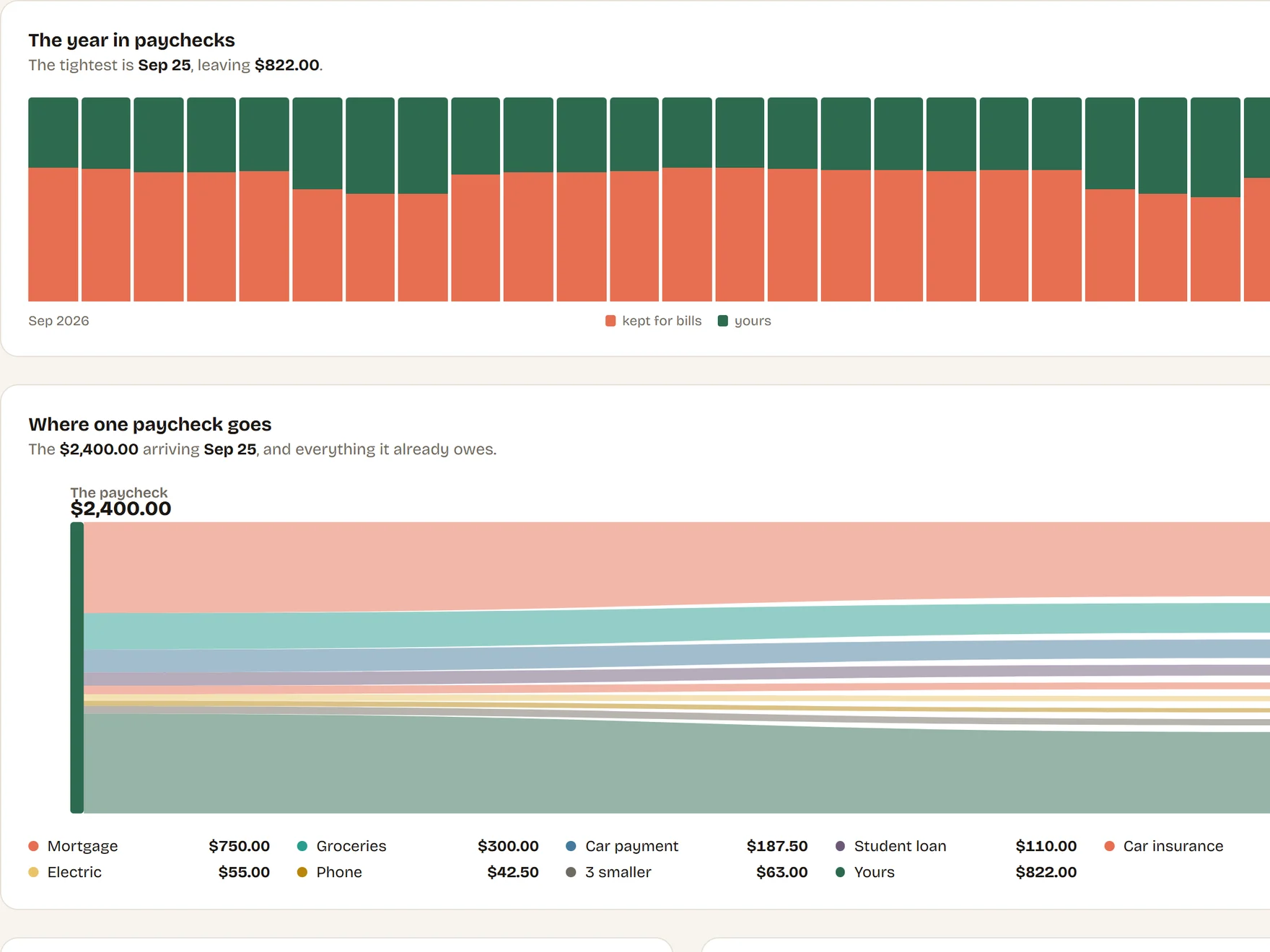
Then it does something Mint never did. Instead of sorting your spending into monthly category buckets, it works per paycheck. Rent is not a monthly abstraction when you are paid every two weeks; part of it comes out of this check and part out of the next one. Atom Budget splits every bill across the paychecks that fund it and tells you two numbers Mint never told you:
- How much of this paycheck is genuinely yours, the moment it lands, once the bills it has to cover are set aside.
- How much you should be holding right now toward bills that have not arrived yet, checked against what your accounts actually hold. When the two disagree, it says so, in red.
If you are paid every two weeks, this is the difference between a budget that describes your month after it happens and one that matches the rhythm your money actually moves in. Three-paycheck months stop being a surprise. They are on the calendar.
What we do not do
Honesty being the whole point of this page: Mint was a dashboard for your entire financial life, and Atom Budget is not trying to be one. There is no investment tracking here, no net worth chart, no credit score. We do not categorize every transaction you make, and we do not try to tell you that you spent 12 percent more on restaurants than the average person in your zip code.
Atom Budget answers a narrower question and answers it well: what does every paycheck have to cover, and is the money that should be set aside actually there. If what you miss about Mint is the everything-dashboard, Empower or Monarch are closer to that shape. If what you miss is a budget that runs itself off your real bills, keep reading.
About "free"
Mint was free because you were the product. It ran ads and earned referral fees for pushing credit cards and loans at you, and when that stopped being worth Intuit's time, the app disappeared. That is the deal with free money apps, and it is worth remembering how it ended.
Our arrangement is simpler. The budgeting engine is free, no card, no time limit, no ads, and we do not sell your data to anyone. Connecting your bank is the one thing that costs us real money per user, so that part is Atom Budget Pro: $8 a month, or $80 a year. Cancel whenever you like, and everything you imported stays in your budget after you do. The privacy policy spells out the rest.
Switching takes ten minutes
There is no Mint export to import at this point, and honestly you would not want one; two-year-old category data is not a budget. Starting fresh is the better version: create a free account, add your paycheck, and either type in your bills or subscribe and let the app pull them from your statements. The review screen shows everything it found, you approve what belongs, and the allocation math starts working immediately.
Create your free account, or read how the setup works first. Either way, no card is required to find out whether this is the thing you have been looking for since March 2024.